
See the whole ONTAP service.Act on what needs attention.
ONTAPMon brings NetApp cluster, capacity, storage-object and network health into clear PRTG sensors. Modern HTTPS REST monitoring is recommended, while proven legacy ZAPI options remain available for existing environments.
Modern REST coverage. One operational picture.
Use concise summary sensors for daily operations, add per-object diagnostic channels with -verbose, and limit large environments with -in: to stay inside PRTG's channel limits.
ONTAPMon.exe -t:<cluster-or-node> -u:<user> -p:<password> -i:<mode> [-in:<instances>] [-verbose] [-wl:<warning>] [-el:<error>]
Use PRTG credential placeholders instead of hard-coded reusable passwords.
RESTAT
Cluster connectivity and node, aggregate, volume and disk health in one stable overview.
RESERVICE
Customer-facing service health, with RESERVICESCOPE for a bounded snapshot-based view.
REAGGR · REVOL · REDISK
Aggregate and volume capacity plus object and disk state with configurable thresholds.
Know the network state. See the performance context.
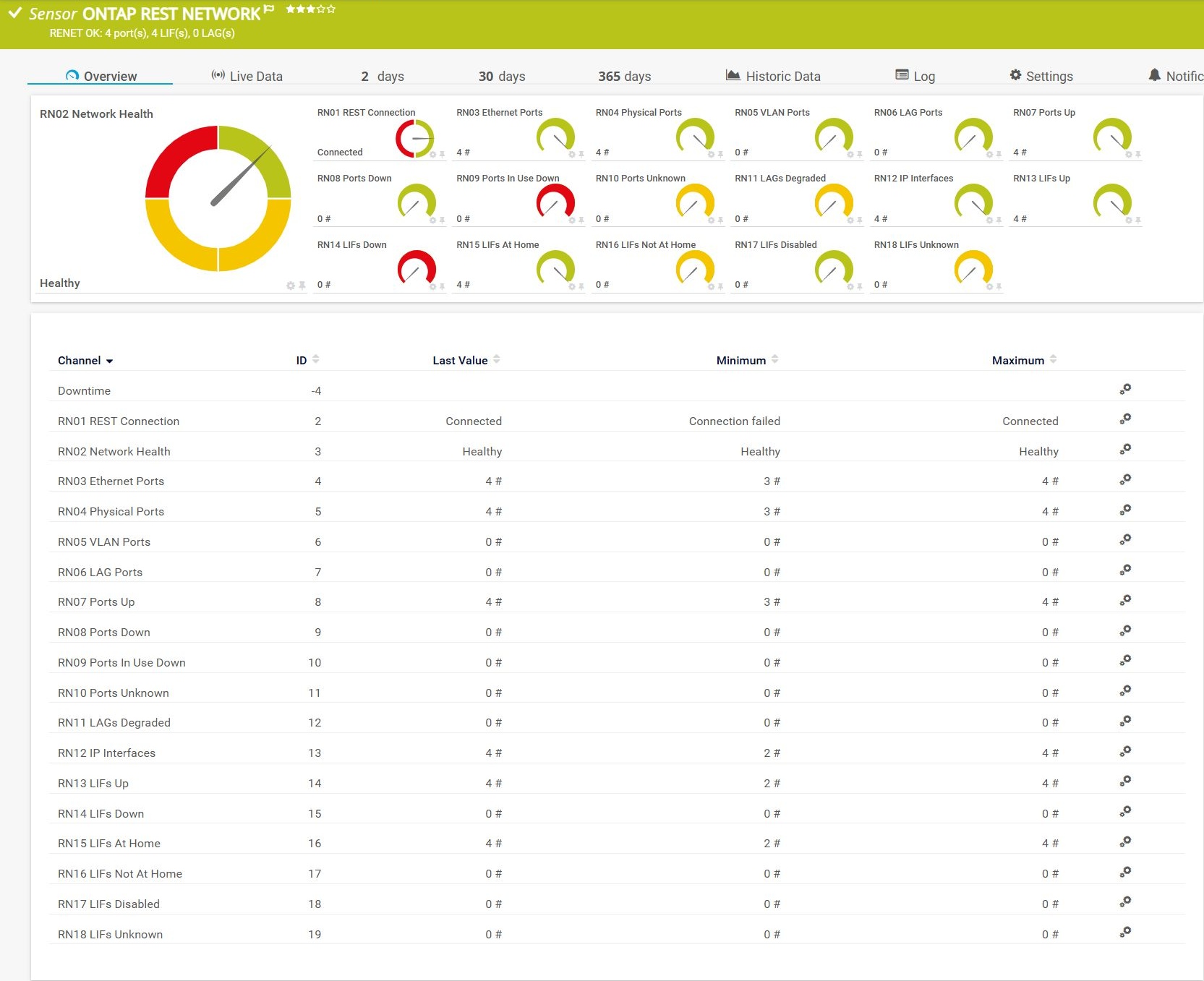
RENET — network status
Reports physical, VLAN and LAG port state, ports in use that are down, degraded LAGs, LIF state and home-location state. Unused down ports do not alert by default; service-impacting states do.
-t:%host -u:%windowsuser -p:%windowspassword -i:ReNet
RENETPERF — Ethernet REST performance
Throughput, utilization, packet rates, errors, discards and link-down events. Metrics require ONTAP 9.8 or later; use legacy IFNET on older systems.
Controlled availability. RENETPERF remains pending validation against a newer ONTAP environment, so no unvalidated screenshot is published.
Keep existing sensors. Move forward deliberately.
Legacy ONTAP7/ManageONTAP ZAPI modes remain available for existing installations, including predefined hardware and performance sets, custom object/counter queries and IFNET monitoring. Use the REST options for new deployments whenever the target ONTAP release supports them.
Install and continue
Install ONTAPMon and the supplied prtgplugins.reontap.*.ovl lookup files with PRTG Plugins Setup 1.5.101. Reload PRTG lookups after updating and recreate or rescan channels when required.